Free Pixel Art Generator
Turn a photo or illustration into pixel art. Choose crisp or smooth sampling, try a fixed palette, and fine-tune the colors before downloading.
Choose an image to preview its colors
Your image
Drop a photo or anime illustration here
JPEG, PNG or WebP · Up to 10 MB
Pixel preview
Your pixel preview will appear here
Choose an image to begin
Your selected image stays on this device. This converter does not upload it or call an AI model.
See what grid and color limits change
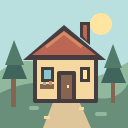
This example uses a simple 128 × 128 illustration with clear shapes and a small palette. The converted image uses a 64 × 64 grid and at most 16 RGB colors. The converter changes the existing pixels rather than inventing a new character or setting.

How to turn an image into pixel art
- 01
Choose an image
Use a photo, an existing anime illustration or the example. Keep your subject easy to read; a simple silhouette works well at small sizes.
- 02
Set the grid and colors
Start at 64 pixels, compare crisp and smooth sampling, then choose image colors or a fixed palette. Fine-tune brightness, contrast and saturation; the preview updates on your device.
- 03
Download your PNG
Save the native grid for pixel editing, or download an enlarged PNG with sharp square pixels. Keep the original image if you want to try other conversions.
Need an original image first?
Create an illustration with the AI anime generator, then save it and bring it here for precise grid and palette conversion. AI creation uses the displayed account credits; local pixel conversion is free.
Pixel art generator FAQ
Is this pixel art generator free?
Yes. Local image conversion and PNG downloads do not require an account or AI generation credits. Creating a new source image with the separate AI generator uses that tool’s normal credits.
Is my image uploaded?
The converter decodes and processes your selected image in your browser. It does not upload the selected file to the site or send it to an AI model. Your image is not saved by this converter. Ordinary page requests and the site’s limited diagnostics are separate from the image processing. Read our privacy policy.
What grid sizes are available?
Choose 32, 64 or 128 pixels for the longest edge. The shorter edge is calculated from the image’s aspect ratio, so a wide or tall photo is not forced into a square. A 64-pixel square source produces a 64 × 64 PNG.
What does the color limit do?
Image colors (adaptive) selects at most 16 or 32 RGB colors from your image. Arcade 16, Sunset 8 and Forest 4 use fixed color sets; the Color limit control is disabled for these palettes. The color chips show the selected set, while the result may use fewer colors. Transparency is preserved after resizing.
Which sampling mode should I choose?
Crisp pixels uses nearest-neighbor sampling without blending neighboring source pixels. Smooth reduction blends them when reducing the image and can help detailed photos. Both previews use sharp integer magnification; try each mode to compare the actual result.
How do the color adjustments work?
Brightness lightens or darkens the image, contrast changes its tonal separation, and saturation changes its color intensity. These adjustments happen before palette mapping. All three start at zero. Reset settings keeps your image and restores the grid, sampling, palette, color limit and adjustments to their defaults.
What is the difference between the two downloads?
The native PNG uses the displayed pixel dimensions. The enlarged PNG scales that grid by an integer factor to a longest edge of 1024 pixels, keeping sharp square pixels rather than smoothing the edges.
Does this use AI to invent a new image?
No. This converter resizes and reduces the colors of an existing image. It does not invent a new pose, remove a background, create editable layers or export animated sprite sheets. Use the AI anime generator if you want to create a new source image first.
Which files can I use?
Choose one JPEG, PNG or WebP up to 10 MB and 25 megapixels. Existing transparency can be kept in PNG exports. Unsupported or unreadable files show an error without being uploaded.